Tutorial
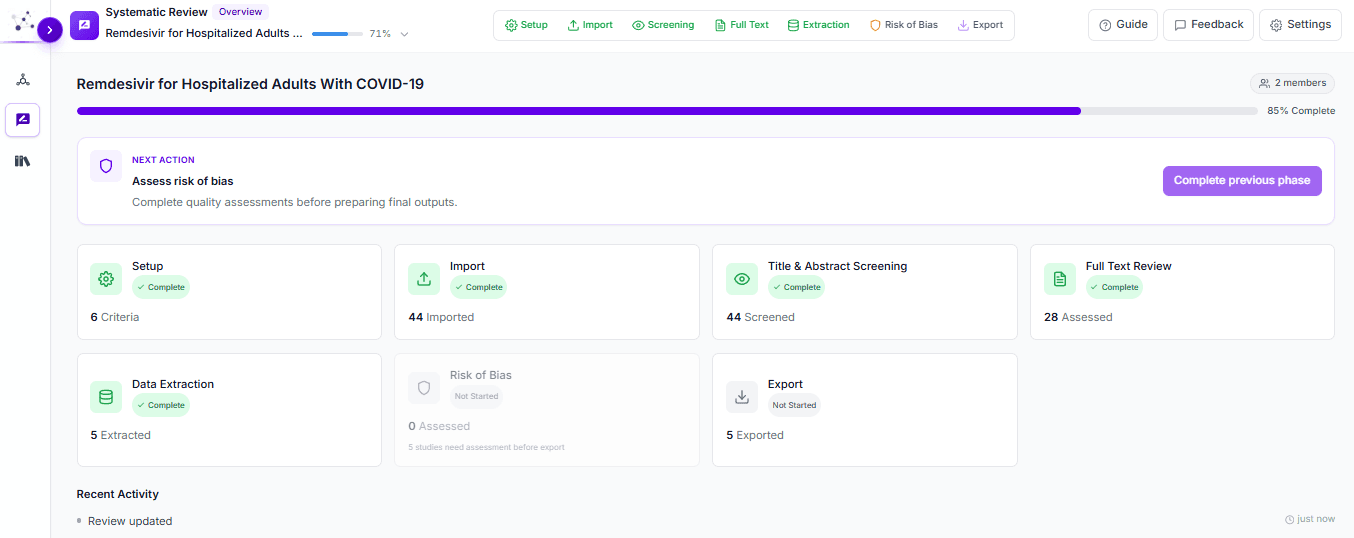
INRA SLR Copilot systematic review workspace with review phase progress
11 min read

How to Run a Systematic Review in SLR Copilot: Step-by-Step

Marwan Taman

Marwan Taman

Founder & CEO, INRA.AI

To run a systematic review in INRA SLR Copilot, work through seven PRISMA-compliant phases: set up your protocol, import and deduplicate citations, screen titles and abstracts, review full texts, extract data, assess risk of bias, and export. AI assists each phase while reviewers keep every inclusion, exclusion, and judgment decision.

If you have ever run a review in Covidence, this will feel familiar. The phases are the same ones the PRISMA 2020 statement expects. What changes is that AI assistance sits inside each phase, and your PRISMA outputs come together as you work. This tutorial walks the full workflow and maps each step to its Covidence equivalent. For the methodology background, see our guide on the anatomy of a systematic review and how narrative and systematic reviews differ.

Is INRA SLR Copilot a good Covidence alternative?

Yes. INRA SLR Copilot runs the same PRISMA-compliant workflow researchers use in Covidence (import, screening, full-text review, extraction, risk of bias, and export), with AI assistance inside each phase and the reviewer keeping control of every decision. It is worth a look because systematic reviews are slow: across a published cohort of 195 reviews, the average took 67.3 weeks from registration to publication (Borah et al., BMJ Open 2017), and screening and extraction ate up most of that time. Almost everything you do in Covidence has a direct equivalent here, so switching mid-review is simple. Export your current reference set and pick up at whichever phase you left off.

In CovidenceIn SLR Copilot
Create a review & settingsSetup phase: review question, eligibility criteria, reviewer settings
Import references (RIS/CSV)Import phase: citation files, database search, ID resolution, deduplication
Title & abstract screeningScreening phase: dual/blinded voting, AI suggestions, conflict queue
Full-text reviewFull Text phase: embedded PDF viewer, eligibility votes, required reasons
Extraction (template builder)Extraction phase: configurable templates, AI extraction assist, dual extraction
Quality / risk of biasRisk of Bias phase: RoB 2 by default, AI suggestions, reviewer overrides
Export & PRISMA diagramExport phase: PRISMA diagrams, references, review counts, extracted data

How do you run a systematic review in SLR Copilot, step by step?

Run a systematic review in SLR Copilot in seven steps: (1) set up the protocol, (2) import and deduplicate citations, (3) screen titles and abstracts, (4) review full texts, (5) extract data, (6) assess risk of bias, and (7) export. The sequence mirrors the four stages of the PRISMA 2020 flow (identification, screening, eligibility, and inclusion), so you build the audit trail your review needs just by doing the work. Each step below shows the workspace and notes the Covidence equivalent.

Step 1: Set up the protocol

Create a new review and lock in the decisions that govern everything downstream. This is the protocol step you complete before importing references into Covidence. State the question in PICO terms (see our PICO framework guide), record inclusion and exclusion criteria, choose single or dual screening, and invite reviewers. Registering the protocol on PROSPERO before screening is best practice for prospective reviews.

What to configure

  • Review question in PICO terms
  • Eligibility criteria so screening stays consistent across reviewers
  • Reviewer settings: single or dual screening, blinded voting
  • Team workspace so everyone works against the same protocol

Step 2: Import your citations

Assemble the record set. Migrating from Covidence? Export your references and bring them straight in. Starting fresh? Search connected databases (such as PubMed, Semantic Scholar, and OpenAlex) from inside the review. SLR Copilot resolves identifiers (DOIs, PMIDs) to canonical metadata and merges duplicate records before screening, so reviewers never vote on the same study twice and your source counts feed the identification numbers in the final PRISMA diagram. For background on building a sensitive search, see our guide to academic search engines and databases.

Step 3: Screen titles and abstracts

Work through a queue of citation cards, casting include, maybe, or exclude decisions against your eligibility criteria. AI suggestions sit alongside each card to help you move quickly through clear cases, but the vote is always the reviewer's. The Cochrane Handbook recommends two reviewers screen independently. Turn on dual screening in Setup and conflicts route to a resolution queue automatically.

SLR Copilot title and abstract screening queue with citation cards and AI suggestions
The screening workspace: reviewer queue, citation cards, include/maybe/exclude controls, and AI suggestions.

Want the detail on how AI relevance checks work without taking the decision out of your hands? Read AI paper screening for literature reviews.

Step 4: Review full texts for eligibility

Studies that pass screening move to full-text review. SLR Copilot puts the PDF, study metadata, and eligibility controls in a single workspace, so reviewers stop switching between a reference manager and a PDF folder the way they often do partway through a Covidence review. Vote on eligibility, require an exclusion reason for any study you drop, and resolve disagreements so only protocol-eligible studies advance to extraction.

SLR Copilot full-text review workspace with embedded PDF viewer and eligibility controls
The full-text workspace: PDF queue, embedded viewer, study metadata, and include/exclude controls.

Step 5: Extract the data

Build an extraction template and capture study-level data. The PDF sits beside your structured fields, and AI extraction assist pre-fills values that you confirm or correct, with each value linked back to its source in the paper. Configure fields for the outcomes, populations, and study characteristics your review needs, and run dual extraction with consensus review where your protocol requires it.

SLR Copilot extraction workspace with PDF beside structured extraction fields
The extraction workspace: study PDF beside structured fields, AI assist, and source-linked values.

Step 6: Assess risk of bias

Appraise each included study. SLR Copilot uses RoB 2 by default, with signaling questions per domain, AI suggestion support drawn from the full text, and reviewer overrides. It is the structured equivalent of the quality assessment you run in Covidence, with the final judgment kept by the reviewer. Other instruments are configurable if your review uses something other than RoB 2.

SLR Copilot risk of bias assessment screen with RoB 2 signaling questions
The risk-of-bias workspace: RoB 2 domains, signaling questions, AI support, and reviewer overrides.

Step 7: Export your PRISMA outputs

Generate your outputs. Because the system tracked counts and decisions from import onward, the Export phase assembles a PRISMA-compliant flow diagram, review counts, reference files, and your extracted data set without manual bookkeeping. Where you used dual review, it also produces inter-rater reliability outputs.

SLR Copilot export screen with PRISMA flow diagram and review data
The export workspace: PRISMA diagram and export-ready counts, references, and extracted data.

How is SLR Copilot different from Covidence?

The workflow is familiar, but four things change in practice. First, AI assistance runs in every phase (screening suggestions, full-text support, extraction pre-fill, and risk-of-bias suggestions), and every suggestion feeds a reviewer decision rather than making it. Second, PDFs, decisions, extraction fields, and bias judgments share one review-scoped workspace, so reviewers stop shuttling files between tools. Third, people stay in the loop: inclusion, exclusion, extraction, and risk-of-bias decisions stay with reviewers, and conflicts are tracked for accountability. Fourth, because the system tracks counts from import, it assembles your PRISMA outputs at export instead of leaving you to rebuild them by hand.

AI assistance inside every phase

Screening, full-text, extraction, and risk-of-bias suggestions are built in, and each one feeds a reviewer decision rather than making it.

One workspace, fewer handoffs

PDFs, decisions, extraction fields, and bias judgments live together, so reviewers stop shuttling files between tools.

Human-in-the-loop by design

Inclusion, exclusion, extraction, and risk-of-bias decisions stay with reviewers, with conflicts and overrides tracked for accountability.

PRISMA outputs without bookkeeping

Counts are tracked from import, so the PRISMA diagram and review data are assembled for you at export.

Frequently asked questions

Can I migrate a review from Covidence to SLR Copilot?

Yes. Export your references from Covidence and import them into a new SLR Copilot review, then continue from whichever phase you left off: screening, full text, or extraction. Deduplication runs on import, so your counts stay clean.

Is SLR Copilot PRISMA-compliant?

Yes. The workflow follows the PRISMA 2020 flow, and the Export phase produces a PRISMA-compliant flow diagram, review counts, and reference files from the decisions you record during the review.

Does AI make the inclusion and exclusion decisions?

No. SLR Copilot is human-in-the-loop. AI surfaces suggestions for screening, extraction, and risk of bias, but reviewers cast every vote and set every final judgment. Conflicts between dual reviewers route to a resolution queue.

Which risk-of-bias tool does it use?

RoB 2 is the default, with signaling questions and reviewer overrides per domain. Other instruments are configurable if your review protocol specifies a different tool.

Ready to run your first review?

Start a systematic review in SLR Copilot and move from protocol to PRISMA-ready export in one workspace, with AI assistance at every step and your team in control of every decision.

About the author

Marwan Taman is the founder and CEO of INRA.AI, where he builds AI systems for literature review and evidence synthesis. A software engineer by background, he is a co-author of an LLM-assisted health-literacy study presented at the American Stroke Association's International Stroke Conference 2026 and published in Stroke. He writes about AI, research workflows, and evidence synthesis. Connect on LinkedIn.

References

  • Page MJ, et al. The PRISMA 2020 statement: an updated guideline for reporting systematic reviews. BMJ 2021;372:n71. bmj.com
  • Borah R, et al. Analysis of the time and workers needed to conduct systematic reviews of medical interventions using data from the PROSPERO registry. BMJ Open 2017;7:e012545. bmjopen.bmj.com
  • Sterne JAC, et al. RoB 2: a revised tool for assessing risk of bias in randomised trials. BMJ 2019;366:l4898. bmj.com
  • Cochrane Handbook for Systematic Reviews of Interventions. training.cochrane.org/handbook
  • PROSPERO international prospective register of systematic reviews. crd.york.ac.uk/prospero